
Key Takeaways
- Claude AI is a family of general-purpose AI assistants built by Anthropic, an AI safety company founded in 2021.
- Law firms most commonly use Claude for client-facing writing tasks: emails, case updates, plain-language explanations, translations, and consultation summaries.
- Privilege is not automatic. Recent federal case law has held that written exchanges with a consumer AI tool do not carry attorney-client privilege or work product protection.
- Enterprise plans with no-training defaults, plus written firm policies, are the baseline for using Claude on any client matter.
What Is Claude AI?
Claude AI is a family of general-purpose AI assistants developed by Anthropic, an AI safety company founded in 2021 by Dario and Daniela Amodei. Anthropic trains Claude using a method called Constitutional AI, which uses a written set of principles to shape the model's behavior during training.Pair it with strong client intake support so AI-drafted messages still land in a working intake workflow.
Claude reads text and images and produces text and code. It does not generate video or audio. It runs on the web, in mobile apps, on desktop, and through an API used by other software products.
For law firms, the most useful surface is the Claude app for individual users and the Team or Enterprise plans for shared use. Attorneys can also access Claude inside third-party legal tools that plug into Anthropic's API.
How Claude AI Is Different From Other AI Chatbots
Claude AI's main differentiators are its safety training approach, long context window, and clear guardrails around sensitive topics. Independent reviews often note Claude's writing quality and its willingness to say "I do not know" when uncertain.
At a high level:
- Built by Anthropic, not by OpenAI or Google
- Trained with Constitutional AI, a principle-driven training method
- Handles long documents well thanks to a large context window
- No native image, audio, or video generation
- Available through consumer apps and an enterprise API
Most law firms evaluating AI tools consider Claude alongside ChatGPT, Gemini, and legal-specific tools like Harvey. For a look at another legal AI comparison, see Legal Intaker's blog on how Harvey AI is transforming modern law firms.
The Claude AI Model Family
Claude comes in three models, tuned for different tasks. Firms usually pick a default model and swap up or down based on the job.
Claude Opus is often reserved for contract analysis or complex research. Claude Sonnet handles most client correspondence. Claude Haiku is a fit for high-volume, low-complexity tasks like tagging or classification.
Claude AI Pricing And Plans
Claude AI pricing spans free consumer access through enterprise contracts. For law firms, the meaningful tiers are Pro, Team, and Enterprise.
For any firm using Claude on client matters, Team or Enterprise is the practical starting point. These plans typically default to no training on your conversations and add SSO, admin controls, and usage governance. Verify current terms with Anthropic directly before signing.
How Law Firms Use Claude AI For Client Communication
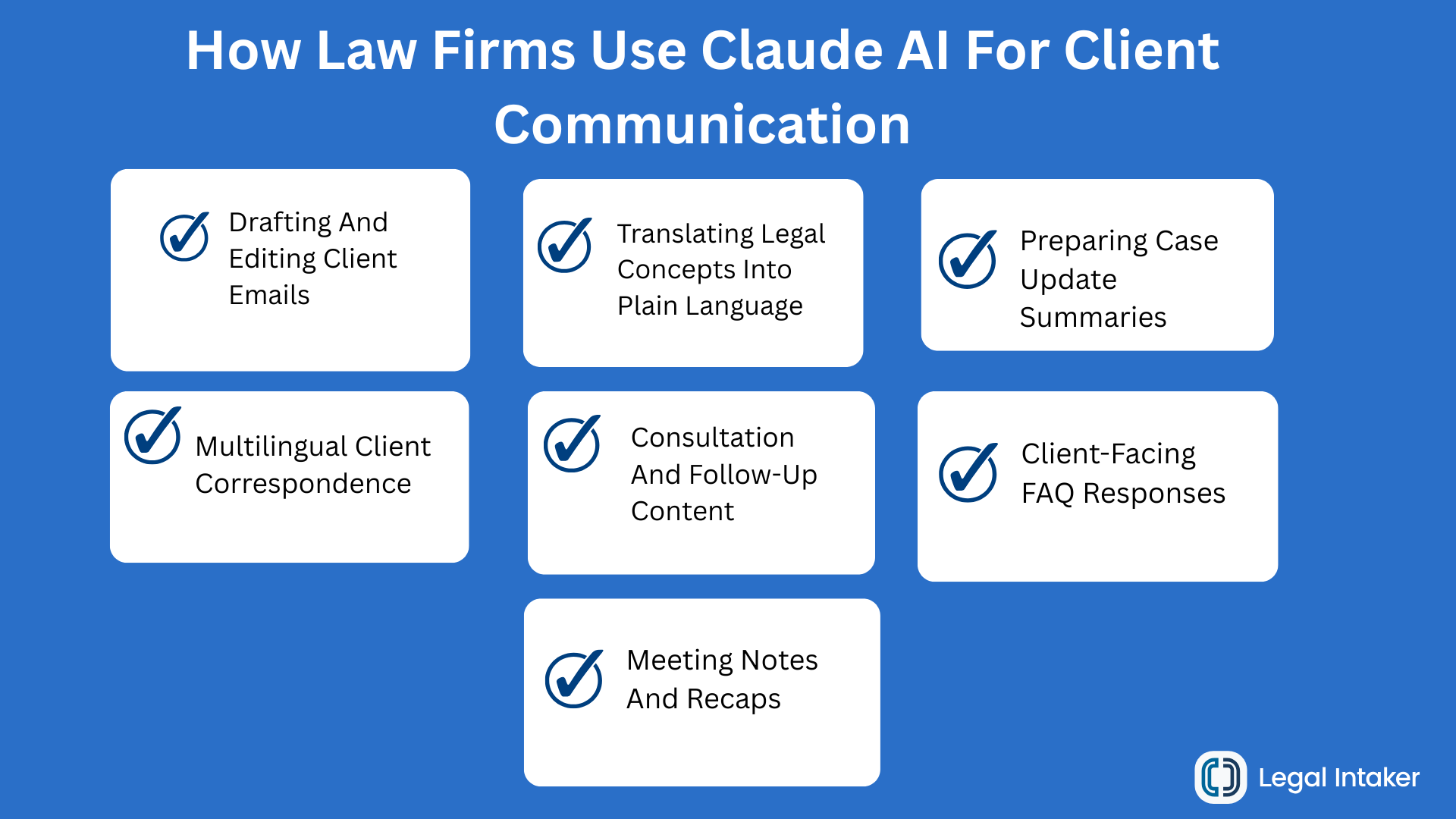
Law firms use Claude AI for client communication in seven common ways. Each one saves time on writing and improves consistency across the firm.
Drafting And Editing Client Emails
Claude turns short bullet notes into a full client email in seconds. Attorneys give the model the recipient, the tone, and the key points. The model returns a first draft the lawyer edits before sending.
Translating Legal Concepts Into Plain Language
Claude rewrites dense legal language into short, readable client-facing explanations. Family law, immigration, and estate planning firms use this on every matter update. The reader gets a two-paragraph explanation instead of a five-page memo.
Preparing Case Update Summaries
Feed Claude a set of docket entries or a hearing transcript, and the model produces a one-page client-friendly summary. Firms use this for monthly status letters, board updates, and post-hearing recaps.
Multilingual Client Correspondence
Claude drafts client communications in Spanish, Mandarin, and other languages, then produces an English back-translation the attorney reviews. Immigration, personal injury, and family law firms with bilingual client bases lean on this heavily.
Consultation And Follow-Up Content
After a consultation, Claude can turn the attorney's notes into a follow-up email, a next-steps outline, and a fee agreement summary. Firms use this to close the loop within hours of the meeting instead of days.
Client-Facing FAQ Responses
Claude drafts consistent answers to the questions clients ask most: how long will my case take, what happens next, why is this taking so long. Attorneys review, approve, and store the answers in a shared library for reuse.
Meeting Notes And Recaps
Fed a rough transcript or bullet notes, Claude produces client-ready meeting summaries and internal action lists. Pair with call tracking and CRM to complete the loop. Legal Intaker's blog on legal intake phone services covers the call side of that workflow.
Beyond Client Communication: Other Law Firm Use Cases
Client communication is where firms usually start, but Claude also handles adjacent work well. Common expansions after firms trust the tool for correspondence:
- Contract review with a firm-approved checklist
- Legal research summaries across long documents
- Discovery review triage
- Deposition prep questions and simulated cross
- Website content drafts and SEO briefs
- Internal training materials and knowledge management
Claude is not a replacement for licensed attorneys, and no output should reach a client without attorney review.
The Privilege Question: What Every Law Firm Must Know
Attorney-client privilege and work product protection are not automatic when a lawyer or client uses a public AI tool. Recent federal case law and multiple state bar opinions have signaled that written exchanges with a consumer AI chatbot can fall outside these protections, particularly when a third-party provider stores the content.
The practical implications for law firms:
- Do not paste privileged client information into a personal or free-tier account
- Use only Enterprise or Team plans with no-training defaults, contractual data protections, and clear retention terms
- Anonymize facts wherever possible before running any AI query
- Document the firm's AI policy in writing and train every attorney on it
- Advise clients to avoid using consumer AI to describe their case in ways that could waive privilege
The American Bar Association publishes ongoing guidance on AI in legal practice, including ABA Formal Opinion 512 on generative AI. Track updates carefully. Several state bars have issued their own opinions.
Ethics And Confidentiality When Using Claude AI
Any AI platform used in a law firm must operate within the American Bar Association Model Rules of Professional Conduct and applicable state bar rules. Claude AI is no exception.
The Model Rules most often cited in AI adoption:
- Rule 1.1 (Competence): attorneys must understand the technology used, including its limits and risks
- Rule 1.6 (Confidentiality): client information stored, transmitted, or processed by AI must be protected
- Rule 5.3 (Supervision): attorneys supervise non-lawyer assistants, including AI tools and staff who use them
- Rule 7.1 (Communications): any AI-generated marketing or client-facing writing must not mislead
Practical checklist for firms adopting Claude:
- Choose Enterprise or Team plans with no-training defaults and data processing agreements
- Turn off any features that store data for model training
- Restrict what data attorneys and staff can paste into the tool
- Require attorney review of every client-facing draft
- Log AI use per matter for audit and quality review
- Train the whole firm quarterly on the policy

How To Set Up Claude AI For Your Law Firm
Set up Claude AI for a law firm in eight steps. Most firms can be live within two weeks.
- Pick the plan. Team Standard for small firms, Enterprise for firms with governance, SSO, or data residency needs.
- Sign the data processing agreement. Confirm no-training terms in writing.
- Write a written AI policy. Include what data may and may not be entered, who reviews outputs, and how firm assets are stored.
- Choose a default model. Sonnet for most firms, Opus for research-heavy practices.
- Build a prompt library. Start with 10 client-communication prompts per practice area.
- Train the team. Two 45-minute sessions cover most staff, plus a written cheat sheet.
- Log AI use. Add a field to the matter file that captures when Claude was used and by whom.
- Review quarterly. Audit prompt library, outputs, and any privileged-data incidents.
A working law firm client intake process makes it easier to slot AI into the right steps without exposing sensitive client data at the wrong stage.
Claude AI Best Practices For Client Communication
Best practices for using Claude on client-facing work cluster around three ideas: brief the model well, review every output, and keep sensitive data out of the prompt.
- Brief the model with role, audience, and tone. A one-sentence brief improves output more than any prompt trick.
- Give context, not identifiers. Explain the matter type and desired outcome without naming clients, dates, or dollar amounts unless required.
- Ask for a first draft, not a final. Instruct the model to leave open questions or bracketed placeholders.
- Review for accuracy and voice. AI drafts drift toward generic phrasing. Edit for the firm's voice before sending.
- Store prompts, not outputs alone. A well-curated prompt library scales the firm faster than saving one-off drafts.
- Never let AI substitute for the attorney's judgment. Use it as a starting point, not a signoff.
Common Mistakes Law Firms Make With Claude AI
Most Claude AI adoption problems share the same root causes. Watch for these.
- Testing on personal Pro accounts with client data
- Pasting whole documents that include sensitive facts
- Sending AI drafts to clients without attorney review
- Using default consumer settings that may store data for training
- Skipping the written firm policy
- Failing to train staff on what to type and what not to type
- Assuming Claude's output is legally accurate on jurisdiction-specific questions
- Believing the client's own use of AI is the firm's problem to fix (it is not, but the firm should advise the client)
Fixing these patterns keeps the firm out of ethics and privilege trouble while still capturing most of the productivity upside.
Claude AI Vs Other Legal AI Tools
Claude AI is a general-purpose assistant, not a legal-specific product. The table below maps where each tool fits.
Many firms use Claude for daily writing tasks and a legal-specific tool for research and case law work. The right stack depends on the practice area and budget.
Turn AI-Drafted Communication Into Signed Cases
AI tools like Claude change how a law firm writes. They do not change how a law firm signs clients. Every AI-drafted email still ends with a person picking up the phone, running intake, and booking the consultation.
See how Legal Intaker pairs bilingual legal intake specialists with HIPAA-grade workflows so the leads your team communicates with actually become clients. Review Legal Intaker pricing or book a walkthrough to see how it fits alongside your AI stack.

Frequently Asked Questions (FAQs):
What is Claude AI in simple terms?
Claude AI is a family of AI assistants developed by Anthropic, an AI safety company founded in 2021. Claude reads text and images and produces text responses. It is used for writing, research summarization, translation, and light coding. It is available through the Claude app, mobile apps, desktop, and an enterprise API.
Who owns Claude AI?
Claude AI is built by Anthropic, an AI safety company headquartered in San Francisco. Anthropic was founded in 2021 by Dario and Daniela Amodei, both former OpenAI researchers, along with other founding team members. The company focuses on building AI systems with a safety-first training approach.
How much does Claude AI cost for a law firm?
Claude AI pricing starts at $0 for individual free access. Pro plans cost $20 per user per month. Team plans start at $25 per seat per month (or $20 per seat annual). Enterprise plans include SSO, data residency, and audit logs and are priced by contract. Most law firms adopting Claude for client work start on a Team or Enterprise plan.
Is Claude AI safe to use for legal work?
Claude AI is built with security controls and offers Team and Enterprise plans with data protection features. Even so, using Claude for client-facing legal work requires a written firm policy, restricted data inputs, attorney review of every output, and awareness that privilege may not extend to AI-processed communications. Never paste privileged content into a consumer-grade account.
What is the difference between Claude AI and ChatGPT?
Claude AI is made by Anthropic. ChatGPT is made by OpenAI. Both are general-purpose AI assistants that produce text. Reviewers commonly describe Claude as strong at long-form writing, careful with sensitive topics, and willing to acknowledge uncertainty. ChatGPT has broader third-party integrations and native image generation. Many firms evaluate both before choosing.
Does using Claude AI break attorney-client privilege?
Using a public or consumer-grade AI to discuss client matters can put attorney-client privilege and work product protection at risk. Recent federal case law and state bar opinions have signaled that AI-processed communications may not automatically qualify for privilege. Firms should use Enterprise plans with data protections, avoid pasting privileged content, and document AI use in writing.
Can Claude AI draft a legal document?
Claude can draft demand letters, engagement letters, client communications, contract clauses, and pleadings, but every output requires attorney review before it goes to a client or a court. Claude does not replace legal judgment, and a firm remains fully responsible for the accuracy of any document it signs.
What are the best Claude AI prompts for lawyers?
The best prompts share three traits. They set a role (act as a family law attorney reviewing this client email), give context (the matter is a custody modification and the client is anxious), and set a task with constraints (draft a two-paragraph email with next steps, no legalese, no bullet points). Refine the prompt library as the firm learns which patterns work.






.png)
.png)











.webp)















.webp)

.webp)









.webp)