
Key Takeaways
- Law firms lose up to 42% of potential clients who never receive a callback after first contact, making a fast, structured intake system non-negotiable (Clio Legal Trends Report, 2023).
- A documented intake flowchart reduces staff errors and cuts administrative time by nearly 30%, freeing attorneys for billable work.
- Conflict-of-interest screening must happen before any legal advice is given — skipping it creates direct malpractice exposure under ABA Model Rules 1.7, 1.9, and 1.10.
- Virtual intake specialists can run your entire non-legal intake workflow around the clock, converting more leads without adding full-time overhead.
Why Your Intake Process Needs a Flowchart, Not Just a Checklist
Most law firms have some version of a client intake process. The problem is it lives in someone's head. When that person is out sick, on vacation, or moves on to another job, the whole thing breaks down with them.
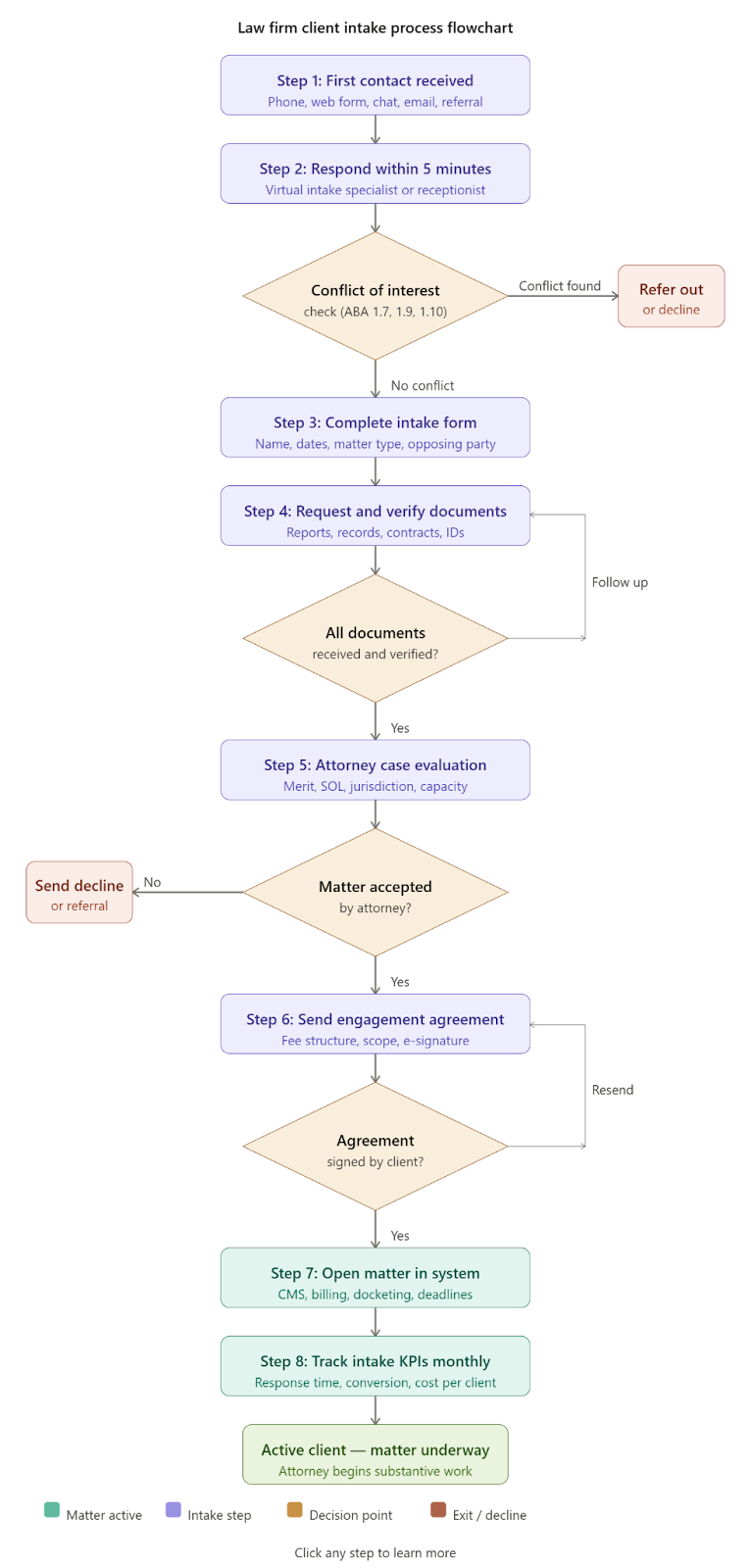
A visual flowchart turns your intake steps into a repeatable system that any team member, including a new hire or a virtual intake specialist, can follow on day one. No guesswork. No dropped leads. No compliance gaps.
According to the 2024 Clio Legal Trends Report, 67% of legal consumers contact more than one law firm before deciding who to hire. Your intake process is the first real experience a prospect has with your firm. Make it count.
Here is exactly how to build one from scratch.
Step 1: Define Your First Contact Channels and Who Owns Them
Before you draw a single box in your flowchart, you need to answer one question: who picks up when a potential client reaches out?
The channels you need to cover:
- Phone calls (still the most common first contact for most practice areas)
- Website contact forms
- Live chat
- Email inquiries
- Social media messages
- Referral submissions from partner attorneys
The Lead Response Management Study found that responding to a prospect within 5 minutes makes you 21 times more likely to qualify that lead than waiting 30 minutes. Every minute you delay, your competitor gets closer to signing that client.
What your flowchart should show at this stage is a decision tree that routes each contact channel to a designated responder, whether that is a receptionist, a virtual intake specialist, or an automated chatbot for after-hours. No contact channel should be an orphan in your flowchart.
Legal Intaker note: Legal Intaker's virtual intake specialists cover all of these channels 24/7, including nights, weekends, and holidays. No more lost leads because someone called at 9 PM after an accident.
Step 2: Run a Conflict of Interest Check Before Anything Else
This step is non-negotiable, and it belongs at the very top of your flowchart, right after first contact.
Under ABA Model Rules 1.7, 1.9, and 1.10, every firm must screen for conflicts before engaging any new client. Running the check after you have already given advice is not just inefficient. It is a bar complaint waiting to happen.
What a complete conflict check covers:
Most practice management platforms, including Clio, MyCase, Filevine, and PracticePanther, have built-in conflict databases. If you are not using one, a searchable master spreadsheet of all client and adverse party names is the minimum you need.
Always document the result of every conflict check, even when no conflict is found. That paper trail protects you.
If a conflict is found, your flowchart should show a clear exit path with a referral process. Do not just dead-end the prospect.
Step 3: Collect Client Information Through a Structured Intake Form
Once the conflict check clears, data collection begins. This is where most firms waste enormous time going back and forth by phone and email because they did not ask the right questions upfront.
Core data points your intake form should capture:
- Full legal name, date of birth, and contact information
- Matter type and key dates (incident date, contract date, filing deadlines)
- Opposing party names and contact details
- Insurance information (critical for PI, workers' comp, and auto matters)
- Prior legal representation on the same issue
- How the prospect heard about your firm (for marketing attribution)
How to collect it without friction:
- Embed an intake form directly on your website through tools like Gravity Forms, Typeform, Lawmatics, or Clio Grow
- Use a secure client portal for transmitting sensitive documents
- Follow up with a structured phone or video intake interview conducted by a trained intake specialist
ABA Model Rule 1.6 requires attorneys to take "reasonable measures" to protect client information. Do not collect sensitive intake data through plain email. Use encrypted channels only.
Step 4: Gather and Verify Supporting Documents
Most matters cannot be properly evaluated without documentation. Getting these early prevents delays and gives the attorney everything needed to make a solid case assessment.
Common documents by practice area:
Document verification steps to include in your flowchart:
- Confirm documents are originals or certified copies
- Cross-reference names and dates against the intake form data
- Flag any missing or expired documents with an automatic follow-up task
- Store everything in a HIPAA-compliant or SOC 2-certified system if health information is involved
Legal Intaker note: Legal Intaker's virtual staff handle document follow-up end to end, sending reminders, collecting uploads through your secure portal, and organizing files by matter so attorneys get a complete package before their first substantive consultation.
Step 5: Evaluate the Case and Qualify the Matter
Not every prospect who completes intake should become a client. A formal qualification step protects the firm from unprofitable or unwinnable matters.
Your qualification checklist should cover:
- Is the statute of limitations still open?
- Is the matter within the firm's licensed practice jurisdictions?
- Does a viable legal claim exist based on the facts provided?
- Is the damages exposure or legal fee sufficient?
- Does the firm have the current capacity to handle this?
The National Law Review reports that law firms with a formal case screening process see a 23% increase in matter profitability compared to firms without structured evaluation.
Case evaluation is an attorney function. However, a well-trained intake team can prepare a complete summary memo so the attorney spends five minutes reviewing rather than thirty minutes gathering scattered facts.
Your flowchart should show two clear outcomes here. Accepted matters move forward to agreement execution. Declined matters trigger a referral or a courtesy decline letter. Neither outcome should fall off the map.
Step 6: Get the Engagement Agreement Signed
Once a matter is accepted, the engagement agreement must be signed before any substantive legal work begins. No exceptions.
Required elements of a valid engagement agreement:
- Scope of representation, including what is specifically excluded
- Fee structure: hourly, flat fee, contingency, or hybrid
- Client responsibilities and cooperation obligations
- Communication expectations and response time commitments
- Termination provisions
- Trust account disclosures (required in most jurisdictions)
Contingency fee agreements must comply with ABA Model Rule 1.5(c). They must be in writing and signed by the client.
Use e-signatures. A 2023 Thomson Reuters survey found that firms using electronic signature tools reduced agreement turnaround time by an average of 78%. DocuSign, Adobe Sign, and native e-signature features within Clio or PracticePanther all get the job done quickly.
Your flowchart should not advance to matter opening until a countersigned agreement is confirmed in your system.
Step 7: Open the Matter and Connect Your Systems
With a signed agreement in hand, the matter is officially open. This step is about making sure everything is set up correctly from day one so nothing falls through the cracks later.
What matter opening involves:
- Create the matter in your case management system with a unique matter number and all client data populated
- Configure the fee arrangement in your billing software, including trust account deposits and invoice preferences
- Enter all critical deadlines into your docketing system immediately, using two-layer docketing with both a primary alert and a reminder alert
- Log the client's communication preferences as stated in the engagement agreement
- Tag the matter with the referral source for marketing ROI tracking
Legal Intaker note: Legal Intaker virtual staff handle CRM data entry, appointment scheduling, and referral source tagging, so attorneys open matters with complete, organized records rather than a pile of scattered notes.
Step 8: Track Your Intake Performance With the Right Metrics
Your intake process is only as strong as your ability to measure it. Without data, you are guessing at what is working and what is not.
Essential intake KPIs every law firm should track:
Use your CRM or practice management platform to generate monthly intake reports. Review them with your intake team and make iterative improvements. Small gains in response time and form completion rate compound into significant revenue differences over a year.
Legal Intaker note: Legal Intaker provides managing partners with monthly intake performance summaries showing lead volume, response times, conversion rates, and process bottlenecks, with no need for a full-time intake manager to compile the data.
The Role of Virtual Intake Staff in a Modern Law Firm
The biggest friction point in most firms' intake processes is human capacity. A great system fails if nobody answers the phone at 7 PM when a personal injury prospect calls from the emergency room.
What trained virtual intake specialists handle:
- 24/7 first-contact coverage across phone, live chat, and web form
- Lead qualification using your firm's customized intake script
- Conflict check data entry and preliminary screening support
- Document request and follow-up coordination
- Appointment scheduling synced with attorney calendars
- CRM data entry and matter preparation
- Multilingual intake support for diverse client bases
The cost of missing intake calls is concrete. At an average case value of $5,000 to $15,000 for a personal injury matter, missing just two qualified leads per week translates to between $520,000 and $1.56 million in lost annual revenue.
Legal Intaker's virtual staffing model gives law firms a dedicated, trained intake team without the cost of full-time W-2 employees. No benefits packages. No PTO gaps. No coverage holes.
Your Intake Process Is a Revenue Engine. Treat It Like One.
The client intake process is not administrative housekeeping. It is the front door of your law firm's revenue pipeline. Every missed call, slow response, and disorganized document request is a client walking next door to your competition.
The firms that dominate their markets in 2026 share one trait: their intake runs like a system, not a scramble.
A standardized, compliant, and data-driven intake process does four things at once. It converts more leads into retained clients. It reduces malpractice risk through proper conflict screening and documentation. It gives attorneys more time to practice law and less time chasing paperwork. And it scales without proportional headcount increases.
Ready to build an intake process that works while you sleep?
Schedule a free consultation with Legal Intaker and discover how our virtual intake specialists can take over your entire first-contact workflow, from qualified leads and organized files to signed agreements, fully managed. Visit legalintaker.com to get started.

Frequently Asked Questions
What should a law firm client intake process include?
A complete law firm client intake process includes first-contact capture, conflict of interest screening, structured data and document collection, case merit evaluation, engagement agreement execution, matter opening in the firm's practice management system, and ongoing performance tracking. Each step should be documented in a flowchart that any team member can follow consistently.
How long should client intake take at a law firm?
Initial data collection should take no more than 10 to 15 minutes for the client. Full intake, from first contact to a signed engagement agreement, should ideally be completed within 24 to 48 hours for non-urgent matters. For personal injury, criminal defense, or any matter with an imminent statute of limitations, same-day engagement is best practice.
Can non-attorney staff manage the client intake process?
Yes, within defined limits. Non-attorney staff and virtual intake specialists can handle first-contact calls, lead qualification, intake form data entry, document collection, appointment scheduling, and CRM management. However, legal advice, case merit evaluation, and conflict-of-interest decisions must be made by a licensed attorney. The best intake workflows assign non-legal tasks to trained staff and reserve attorney time for legal judgment calls only.
What is the biggest mistake law firms make with client intake?
The most common and costly mistake is relying on an informal, person-dependent process with no documented flowchart. When intake lives in one person's head, every absence creates a gap. The second most common mistake is slow response time. Firms that take longer than 30 minutes to respond to a new inquiry lose a significant portion of potential clients to competitors who answer faster.





.png)
.png)













.webp)














.webp)

.webp)









.webp)