
Key Takeaways
• USCIS grants only 87 days to respond to an RFE and 30 days for a NOID managing immigration cases without a structured deadline system puts every matter at risk.
• Legal professionals who handle immigration case management remotely must operate a three-layer USCIS status monitoring stack not a single calendar reminder.
• The right immigration case management software eliminates repetitive tasks, reduces errors, and gives case managers greater visibility across all active deadlines.
• Virtual case managers with immigration law training can own RFE tracking and NOID monitoring end-to-end, freeing attorneys to focus on response strategy.
The Margin for Error on RFE Deadlines and NOIDs Is Zero
For any immigration attorney managing an active caseload, few operational risks carry higher stakes than a missed RFE or NOID. These are not administrative formalities they are time-limited legal events that determine whether an immigration case survives or collapses.
Both RFE and NOID response deadlines begin on the USCIS issue date, not the date the notice is received. That distinction alone, compounded by mail lag and inconsistent case status monitoring, has cost law firms winnable cases.
The challenge for remote immigration case managers is compounded by how these notices arrive. Depending on the immigration forms filed and the petition type, RFEs and NOIDs may land in a USCIS online account, at the attorney of record's physical address, or at the petitioner's address.
Without a deliberate, multi-channel monitoring system, critical information falls through gaps and by the time it surfaces, the response window may already be compromised.
The stakes are especially high in immigration practice, where USCIS deadlines are fixed and extensions are rarely granted. Remote case managers and virtual assistants handling case status monitoring must operate with the same urgency and precision as in-house staff if not more, given the added complexity of distributed workflows and physical mail routing.
According to USCIS policy, the response clock on an RFE begins the date of issuance not the date of receipt. That distinction, compounded by mail lag and inconsistent case status monitoring, has cost law firms winnable cases.
This guide gives remote immigration case managers and virtual assistants a concrete, step-by-step best-practices framework for USCIS status monitoring, RFE deadline tracking, NOID escalation, and the document management protocols that protect every filing window.
RFEs, NOIDs, and Related Notices: What Every Immigration Case Manager Must Know
Before building any tracking system, remote case managers need to distinguish between notice types, response windows, and consequence levels. Errors in this foundational understanding cascade into everything downstream.
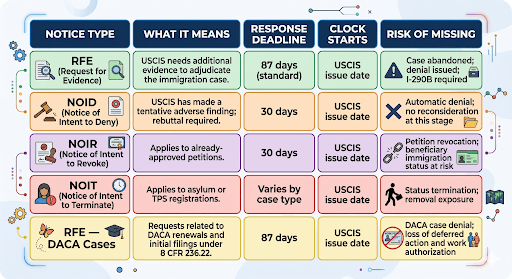
DACA cases deserve a specific callout for immigration case managers who handle mixed-portfolio caseloads. DACA renewals have their own processing timelines and EAD expiration tracking requirements, and a lapse caused by a missed RFE in a DACA case carries direct employment consequences for the beneficiary. The same tracking discipline applies the stakes are simply more immediate.
Best Practice 1: Build a Three-Layer USCIS Status Monitoring Stack
The most common failure in remote immigration case management is over-reliance on a single monitoring channel. No single tool not your immigration case management software, not USCIS email alerts, not a shared Google Calendar entry is sufficient on its own. Effective USCIS status monitoring requires three independent layers working in parallel.
Layer 1 Manual Case Status Queries (Primary)
Log in to my.uscis.gov daily and query every active case using its receipt number (e.g., EAC-23-XXX-XXXXX) non-negotiable for any case past average processing times or with an open RFE window. Document each check with a status result and timestamp directly in your case management platform to maintain an auditable log.
Layer 2 Automated USCIS Notifications (Secondary)
USCIS offers email and text alerts when a case status changes enroll every active case at the time of filing. Treat these as background redundancy only, as notifications carry documented lags of 24 to 72 hours and do not replace the daily manual check.
Layer 3 Physical Mail Triage Protocol (Critical for Remote Work)
Many form types — I-485, I-130, I-140 paper filings, and consular processing cases still generate RFEs and NOIDs sent via physical mail, and a remote case manager without an interception protocol is operating with an open tracking gap.
Best practices to close it:
- Designate one in-office team member or a commercial mail scanning service as the daily mail triager for all USCIS correspondence.
- Require same-day scanning and upload of any notice to the firm's document management system no exceptions for important documents arriving via USPS.
- For e-filing cases (H-1B, I-90, N-400, I-539 via the USCIS online account), all notices are delivered digitally to one platform confirm the account is linked to the attorney of record and that the case manager has delegated access.
- Use USPS Informed Delivery for paper petitions filed at USCIS Lockboxes to receive same-day notification of incoming mail with scanned images, adding a low-cost redundancy layer.
Best Practice 2: Maintain a Dedicated RFE and NOID Tracking Log
A calendar entry is not a case management system. It is a single data point with no context, no escalation path, and no audit trail. Remote case managers need a structured tracking log — built inside their immigration case management software or maintained as a standalone tracker that captures all critical information needed to manage every open response window.
Every entry in the tracker must capture the following fields. Missing any of them creates a compliance and liability gap:
Platform note: Immigration case management software platforms such as Docketwise, INSZoom, and Imagility have built-in RFE tracking modules with automated workflows that can pre-populate most of these fields from case data already in the system. If your firm uses a general legal platform (Clio, MyCase), create a custom matter stage or task template for RFE/NOID cases. The goal is to manage all case information, contacts, deadlines, tasks, and documents in one platform not across disconnected tools.
Best Practice 3: Work Every RFE Deadline Backwards Not Forwards
Most deadline failures happen because teams anchor on the final submission date without assigning intermediate milestones. Effective immigration case management means building a backward timeline from D-0 (USCIS deadline) and assigning each milestone an owner, a due date, and a completion trigger.
Best Practice 4: Follow a Documented Daily and Weekly Monitoring Routine
Inconsistent monitoring is operationally indistinguishable from no monitoring. A remote case manager who checks case status three days in a row and then skips two days has not built a system — they have built a gap. Every legal professional on the team must follow the same documented routine, executed consistently, regardless of workload pressure.
Daily Routine (15–20 minutes non-negotiable)
• Morning USCIS status check: Query all active receipt numbers on my.uscis.gov. Log case status and timestamp in your case management platform for every case checked.
• Inbox and online account triage: Review firm email and the USCIS online account for new NOAs, RFEs, NOIDs, biometrics notices, and interview letters.
• Physical mail scan review: Confirm receipt of same-day scans from in-office triage or scanning service. Upload all physical files to document management immediately. Do not allow a backlog of unreviewed physical mail.
• Deadline dashboard: Open your RFE/NOID tracker and confirm no deadlines fall within 14 days without a submitted response or an active draft under attorney review. Flag any gaps before starting other tasks.
Weekly Routine (30 minutes every Monday)
• Full docket sweep: Review all open immigration cases past average USCIS processing times. These are the matters most likely to be pending an RFE that has not yet been issued proactive monitoring here reduces surprise deadlines.
• Visa Bulletin review (first Tuesday of each month): Check for priority date movement or retrogression that may affect concurrently filed I-485s. Document findings in case files for affected matters.
• Reporting and data review: Pull a matter status report from your immigration software to identify areas where cases are stalled, evidence is overdue, or client communication has lapsed. Use this data to enhance your firm's SLA on client satisfaction.
• Escalation log review: Confirm all escalation flags from the previous week have been resolved and documented. No open escalation should carry over without a documented status and an assigned next action.
Best Practice 5: Match Each Monitoring Function to the Right Tool
Immigration case management requires a stack of coordinated tools not a single platform that claims to do everything, but a deliberate selection of best-in-class tools for each function, all feeding into one central record. Here is the recommended tool map for remote case managers:
A note on Google Calendar: Google Calendar shared across the firm is a legitimate secondary layer for deadline visibility especially useful for attorneys who want a high-level view of upcoming RFE response dates. It is not, however, a case management tool. It cannot store case information, organize contacts, attach evidence, flag escalations, or generate reporting. Use it as a convenience layer, not a foundation.
On security: Immigration case files contain Personally Identifiable Information (PII), biometric data, and in some cases national security-sensitive information. Your immigration software and document management platform must meet robust security measures: SOC 2 Type II certification, AES-256 encryption at rest, role-based access controls, and multi-factor authentication are the baseline for any platform handling immigration data. Verify these features before onboarding any new platform, and conduct a security audit annually.
The Role of Virtual Immigration Case Managers in RFE and NOID Tracking
Remote work has normalized the separation between physical presence and operational effectiveness. What it has not changed is the need for structured, consistent execution. Virtual immigration case managers when properly trained, tooled, and supervised can own the entire RFE and NOID tracking function end-to-end.
This is the division of labor that high-performing immigration law firms are building:
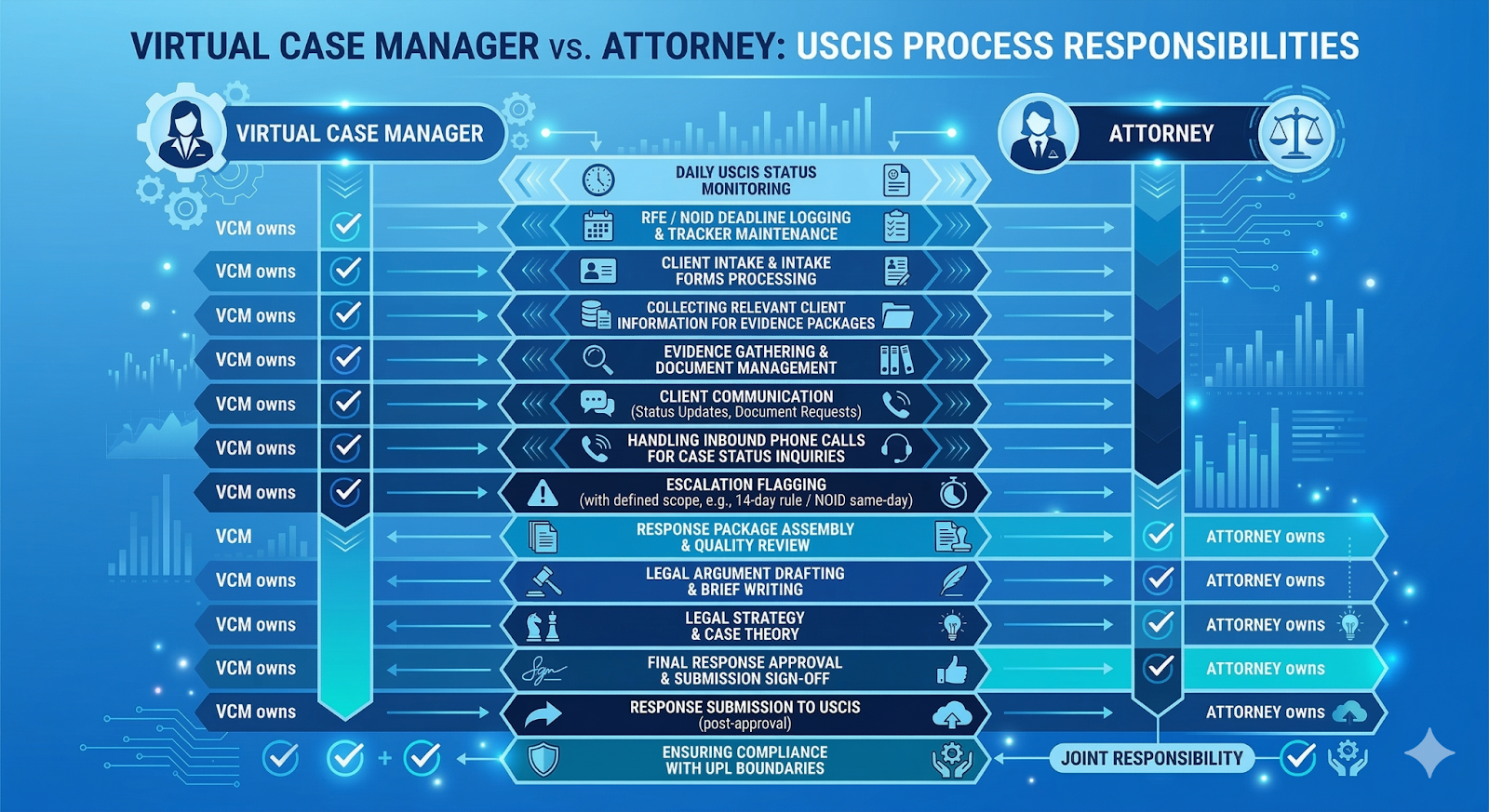
Immigration attorneys bill at $250–$500+ per hour having them manage daily USCIS status monitoring, log RFE deadlines, process intake forms, and handle routine client communication is one of the highest-cost, lowest-leverage uses of attorney time in any immigration practice.
Virtual case managers with specific needs-matched training handle these operational functions at a fraction of the cost and with greater consistency than attorneys context-switching between legal work and administrative tasks. Legal Intaker places case management specialists not general virtual assistants who are trained specifically for immigration law workflows and plug into your existing immigration case management software and firm processes from day one.
Firms using dedicated virtual case managers for RFE and NOID tracking report fewer escalation failures, faster evidence-gathering turnaround, and measurably higher client satisfaction scores compared to models where attorneys self-manage their dockets.
Deadlines Do Not Wait: Build the System Before You Need It
RFE deadlines and NOID response windows are among the highest-stakes operational constraints in immigration law and among the most preventable failures. The firms that consistently protect every deadline are not the ones with the most attorneys or the biggest budgets. The firms that stay ahead build before a notice arrives a three-layer monitoring stack, a structured deadline tracker, a backward-mapped response timeline, and a non-negotiable daily monitoring routine.
Remote case managers who operate within this system free their immigration attorneys to do what only attorneys can do legal strategy, argument, and advocacy instead of spending valuable time policing dockets and chasing evidence. That division of labor is not just operationally efficient. It is how immigration practices scale without burning out their legal team or exposing clients to avoidable risk.
If your firm does not yet have a dedicated immigration case manager to own this function, that gap is exactly where cases fail. Legal Intaker places trained virtual immigration case managers with law firms that need reliable, protocol-driven remote support for USCIS status monitoring, RFE deadline tracking, NOID escalation, client communication, and evidence coordination handled with precision, every business day.
👉 Ready to close the gap? Visit legalintaker.com to explore virtual immigration case manager placements built for your firm's specific needs.
👉 Not sure where to start? Book a free consultation today and get a staffing recommendation tailored to your current caseload and case type mix.

Frequently Asked Questions
What is the exact RFE response deadline, and does USCIS ever extend it?
The standard RFE response window is 87 days from the USCIS issue date — not the date your firm receives the notice. USCIS does not extend RFE deadlines under normal immigration process rules. The only documented exceptions have been formal blanket policy extensions (e.g., COVID-era policies, now fully expired). If a deadline is missed, USCIS issues a denial. The only recourse is Form I-290B (motion to reopen), which carries additional filing fees, processing delays, and no guaranteed outcome. There is no administrative flexibility on this date — it must be tracked with the same precision as a court deadline.
How do remote immigration case managers monitor USCIS case status effectively?
Effective remote USCIS status monitoring runs on three layers — daily receipt number queries on my.uscis.gov, automated email/text notifications enrolled at filing, and a same-day mail scanning protocol — with every check logged and timestamped in case management software. E-filed cases eliminate the physical mail variable entirely, but paper-filed cases require a commercial mail scanning service or designated in-office scanner with a same-day upload SLA to maintain full visibility remotely.
What is the difference between an RFE and a NOID in immigration law?
An RFE signals USCIS needs more evidence to approve a case and carries an 87-day response window, while a NOID signals a preliminary denial decision with only 30 days to rebut requiring immediate attorney escalation and carrying significantly higher stakes. An RFE is a documentation gap; a NOID is an adversarial proceeding at the administrative level.
Can virtual case managers handle DACA cases and specialized immigration case types?
Yes — provided the virtual case manager has training specific to the case type, as DACA cases involve distinct form sets, renewal timelines, EAD expiration tracking, and USCIS processing nuances that differ from other categories. Legal Intaker matches virtual case managers to firms based on specific needs, including case type portfolio, ensuring DACA-focused staff are trained on the relevant forms, renewal windows, and document management requirements. Attorneys retain full responsibility for legal advice and strategy, while virtual case managers own the operational execution within clearly defined, UPL-compliant task boundaries.


.png)
.png)














.webp)














.webp)

.webp)









.webp)