
Key Takeaways
- Electronic signatures are fully enforceable under the ESIGN Act and UETA, but only when four specific validity conditions are satisfied for each document.
- Wills, court orders, adoption papers, and several other document types are legally excluded from e-signature statutes and still require handwritten signatures.
- The best e-signature tool for a law firm is the one that generates ESIGN-compliant audit trails, supports signer authentication, and integrates with your practice management system.
- Legal-Trained Virtual Assistants can handle the daily e-signature workflow so attorneys stay focused on billable work rather than document administration.
If your law firm is still relying on wet signatures for routine client agreements, you are losing time your competitors have already reclaimed. But switching to electronic signatures without understanding the legal requirements is a different kind of problem. A missing consent record or a signature on an excluded document type can void an agreement entirely and create real malpractice exposure.
This guide walks you through exactly what the law requires, which documents are off-limits, how courts assess validity challenges, and which tools are actually built for law firm use.
What Electronic Signatures Actually Are
The ESIGN Act defines an electronic signature as "an electronic sound, symbol, or process, attached to or logically associated with a contract or other record and executed or adopted by a person with the intent to sign."
That definition is broader than most people expect. It covers all of the following:
- A typed name at the bottom of an email
- A clicked "I agree" checkbox on a web form
- A finger or stylus signature on a touchscreen
- A scanned image of a handwritten signature
- A biometric input like a fingerprint or voice confirmation
- A cryptographically secured digital signature using Public Key Infrastructure (PKI)
Not all of these carry the same evidentiary weight, though. A typed name in an email is technically valid, but proving that the right person typed it is much harder than producing a platform-generated audit trail with a timestamp, IP address, and device fingerprint. That difference becomes critical when a signature is challenged in court.
The Legal Framework Law Firms Must Know
Two overlapping laws govern electronic signatures in the United States.
The ESIGN Act (Federal, 2000)
The Electronic Signatures in Global and National Commerce Act (15 U.S.C. § 7001) established three foundational rules:
- No contract or record can be denied legal effect solely because it exists in electronic form
- Both parties must actively consent to conducting the transaction electronically; consent cannot be inferred from silence
- Electronic records must be capable of accurate reproduction for later reference by all parties
ESIGN covers interstate commerce and federal transactions. It does not override state law that is consistent with its principles.
The Uniform Electronic Transactions Act (UETA)
UETA has been adopted by 49 states and Washington D.C. New York uses its own law, the Electronic Signatures and Records Act (ESRA), which works similarly. UETA governs intrastate transactions and mirrors ESIGN in its core requirements.
Here is what UETA requires for an e-signature to be valid:
State-Level Rules That Catch Firms Off Guard
UETA creates a consistent baseline, but states have layered on their own requirements. Law firms working across state lines need to know these before rolling out any firm-wide e-signature policy.
- Illinois excludes mortgage foreclosure documents from UETA coverage entirely
- Washington State requires qualified electronic signatures for real property transactions
- California mandates specific consumer disclosures before electronic consent can be established
- Texas permits electronic wills, but only under a 2019 statutory amendment that most other states have not adopted
A single e-signature policy will not work across all jurisdictions. The safer approach is a document-type matrix that maps each category against the applicable state rules before any signature is sent.
Documents You Cannot Sign Electronically
This is where firms get into trouble. ESIGN Section 103 explicitly excludes certain document types from its coverage. Using an electronic signature on one of these documents does not just create a procedural issue; it can make the document legally worthless.
Excluded under ESIGN Section 103:
- Wills, codicils, and testamentary trusts
- Adoption, divorce, and most family law matters governed by state domestic relations law
- Court orders, court notices, and other official court documents
- Notices of utility service cancellation
- Product recall notices tied to health or safety
Common state-level additions:
- Deeds conveying real property in many states (notarized wet signatures are still required)
- Health care powers of attorney in several jurisdictions
- UCC Article 9 financing statements in some states
If your firm handles EU clients, keep in mind that eIDAS does not override national exclusions either. Germany, for example, requires a Qualified Electronic Signature or notarization for certain employment termination agreements.
How Courts Decide If an E-Signature Is Valid
When a signed document is challenged, judges do not just look at the signature itself. They examine the entire process around it.
Authentication evidence. Can you prove who signed? The strongest proof is a platform-generated audit trail that logs the signer's IP address, timestamp, geolocation, and device ID. Without this, attribution becomes a credibility contest.
Consent records. You need to show that both parties agreed to use electronic signatures before the document was signed. The consent log needs to be retained separately from the executed document itself.
Tamper evidence. PKI-based signatures embed a cryptographic hash of the document at the moment of signing. Any subsequent change to the document breaks the hash and flags the document as altered. Platforms that lack this feature offer much weaker protection.
Signer capacity and intent. Courts have invalidated e-signatures where there was no clear evidence the right person signed, or where the signer appeared not to understand what they were signing. In Ruiz v. Moss Bros. Auto Group (Cal. App. 2014), an arbitration clause was voided in part because the employer could not prove which specific employee had completed the electronic signature process.
The Best E-Signature Tools for Law Firms in 2026
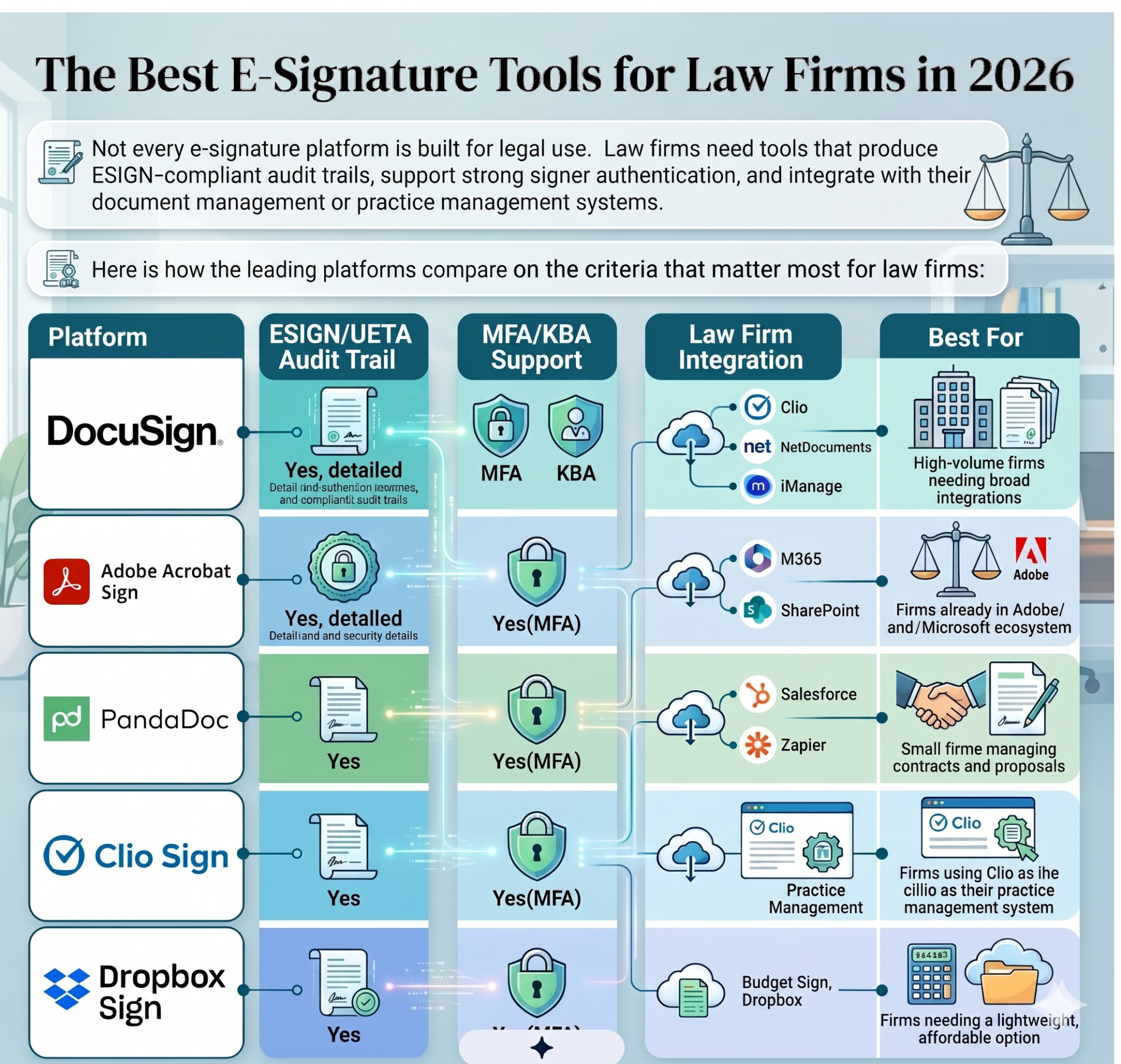
A few things to confirm before committing to any platform:
- Does it produce a tamper-evident Certificate of Completion with every executed document?
- Does it support knowledge-based authentication (KBA) for transactions requiring stronger identity verification?
- Can it be configured to prevent sending certain document types for electronic signature, so excluded categories do not slip through?
- Where does it store signed documents and audit logs, and for how long?
Building a Compliant E-Signature Workflow at Your Firm
Choosing the right tool is only part of the equation. The bigger risk for most law firms is inconsistency: different attorneys using different processes, no clear policy on excluded documents, and consent records that are incomplete or missing altogether.
A defensible workflow covers these six steps:
- Document classification. Before any document goes out for signature, it needs to be categorized against your firm's policy and the applicable state rules. This is where most compliance failures start.
- Platform selection for the transaction. High-value agreements and cross-border transactions need stronger authentication. A standard retainer might be fine with basic MFA; a regulated financial document may require KBA or even QES.
- Consent capture. Obtain explicit written consent from the client to conduct the transaction electronically. This consent record is separate from the document being signed and needs to be retained independently.
- Signer authentication. Match the authentication method to the risk level of the document. Multi-factor authentication covers most situations. Knowledge-based authentication is worth the extra step for sensitive matters.
- Record retention. Store the executed document and the full audit trail in a format that can be reproduced accurately for the entire applicable statute of limitations. Do not store only the PDF.
- Exception handling. Maintain a clear list of document types that require wet signatures or notarization. Every person who touches documents at your firm should know this list and know to escalate before sending.
How Virtual Staffing Keeps Your E-Signature Process Airtight
Running a compliant e-signature workflow at volume is operationally demanding. It requires someone who understands both the legal requirements and the platform itself, and who can consistently catch problems before they become malpractice risks.
Most law firms do not have a dedicated person in that role. Attorneys do not have time for it, and generalist administrative staff often lack the legal knowledge to spot a problem with a document type or a missing consent record.
This is the gap that Legal Intaker's Legal-Trained Virtual Assistants are built to fill.
A U.S. Law Experienced virtual assistant from Legal Intaker's Pre-Vetted Talent Pool can take ownership of your entire e-signature workflow, including:
- Classifying incoming documents against your firm's e-signature policy before anything goes out for signature
- Sending and tracking signature requests through your preferred platform, with follow-up built in
- Reviewing completed signature packages for compliance gaps such as missing consent logs, incomplete authentication records, or documents that should have required wet signatures
- Maintaining your jurisdiction-specific exception list and flagging anything that needs attorney review
- Archiving executed documents alongside their full audit trails in your document management system
The difference between a Legal-Trained Virtual Assistant and a general admin is that the virtual assistant understands why these steps matter. They know the difference between an ESIGN-compliant client retainer and a court-filed stipulation that cannot be executed electronically. That knowledge is what prevents the errors that lead to malpractice claims.
Legal Intaker's Pre-Vetted Talent Pool is available on demand. Firms can scale support up during high-volume periods and back down when caseloads ease, without the cost of adding a permanent staff member.
Your Next Step Toward a Compliant Workflow
Electronic signatures save law firms significant time and, when implemented correctly, they are just as legally defensible as wet signatures. The ESIGN Act and UETA provide a clear framework. The tools to support that framework are mature and widely available. The real challenge is consistent execution: classifying documents correctly, capturing consent properly, using the right authentication for each transaction type, and keeping a clean paper trail on every signed document.
Firms that get this right do not just avoid malpractice risk. They also close client agreements faster, reduce administrative bottlenecks, and free their attorneys to focus on the work that actually drives revenue.
Legal Intaker's Legal-Trained Virtual Assistants give you the operational infrastructure to run that workflow reliably. You get U.S. Law Experienced support from a Pre-Vetted Talent Pool, available on demand, without the overhead of a full-time hire.
Talk to Legal Intaker About Virtual Staffing for Your Firm

Frequently Asked Questions
Are electronic signatures legally binding for law firms?
Yes. Under the ESIGN Act and UETA, electronic signatures are legally binding for most legal agreements, including client retainers, settlement agreements, and NDAs. The key conditions are that both parties consent to the electronic process, the signer clearly intends to sign, and the signature can be attributed to the correct individual. Wills, court orders, adoption papers, and a handful of other document categories are excluded by statute and still require handwritten signatures.
What makes an electronic signature legally valid?
Four elements need to be present. The signer must clearly intend to sign. Both parties must consent to conducting the transaction electronically before the signature is collected. The signature must be logically connected to the specific document being signed. And there must be a reliable way to attribute the signature to the correct person. A platform-generated audit trail with a timestamp, IP address, and authentication record is the strongest evidence that all four conditions were met.
Can a scanned handwritten signature count as an electronic signature?
Yes, a scanned signature qualifies as an electronic signature under ESIGN and UETA. The problem is evidentiary. If a signing party later denies executing the document, a scanned image alone provides almost no technical proof of who signed or when. For any agreement where a dispute is plausible, a platform-generated signature with a full audit trail is significantly more defensible than a scanned image.
Which e-signature platform is best for law firms?
The right answer depends on your practice management setup and volume. DocuSign is the strongest choice for firms needing broad integrations and high-volume throughput. Clio Sign is the natural fit if your firm already runs on Clio. Adobe Acrobat Sign works well for firms embedded in the Microsoft or Adobe ecosystems. For smaller firms watching costs, Dropbox Sign covers the compliance basics at a lower price point. All of the above produce ESIGN-compliant audit trails when configured correctly.






.png)
.png)










.webp)















.webp)

.webp)









.webp)