.webp)
Key Takeaways
- Legal marketing automation uses software to handle repetitive lead, intake, and follow-up work so attorneys can focus on cases.
- The strongest stacks pair a legal-specific CRM such as Lawmatics, Law Ruler, or Clio Grow with general tools like CallRail, Calendly, and an email platform.
- Speed-to-lead is the highest-impact automation. Industry research shows responding within five minutes dramatically raises the chance of qualifying a lead.
- Seven workflows deliver most of the ROI: speed-to-lead, nurture, intake forms, scheduling, reviews, referrals, and re-engagement.
- Every automated message still has to comply with ABA Model Rule 7.1 and state bar advertising rules.
Quick Answer
Legal marketing automation is software that captures, qualifies, and follows up with law firm leads automatically through forms, email, SMS, and CRM workflows. Pair it with strong client intake support to turn leads into signed cases.
What Is Legal Marketing Automation?
Legal marketing automation is the use of software to run repetitive marketing and intake tasks for a law firm without manual effort. It connects ad clicks, forms, calls, and emails to a CRM, then triggers the right message to the right lead at the right time.
The tools usually cover four areas: lead capture, intake screening, multi-channel follow-up, and reporting. The point is to remove the gaps where leads go cold, while keeping every message compliant with bar advertising rules.
Done well, automation pays for itself in two ways. It increases the percentage of leads that become consultations, and it gives partners back hours each week that used to go to chasing inquiries.
Why Legal Marketing Automation Matters In 2026
Legal marketing automation matters in 2026 because client expectations and ad costs are both rising, and manual follow-up no longer keeps up. Firms that automate the basics consistently outperform firms that still rely on email inboxes and sticky notes.
Speed is the clearest example. Industry research on lead response has long shown that contacting a lead within the first five minutes sharply raises the odds of qualifying that lead, compared with responses that take an hour or more. Most law firms cannot deliver that speed manually outside business hours.
Marketing budgets have also gone digital. The Clio Legal Trends Report 2024 found that most law firms now spend at least half of their marketing budget online, with many at 76 to 100 percent online. Without automation, that paid traffic produces leaks instead of cases.
What Legal Marketing Automation Can Do
Legal marketing automation can handle every repetitive step between a prospect's first click and a signed engagement. The tasks below are the ones that move the most revenue.
- Capture leads from web forms, landing pages, and chat
- Trigger instant SMS and email when a lead arrives
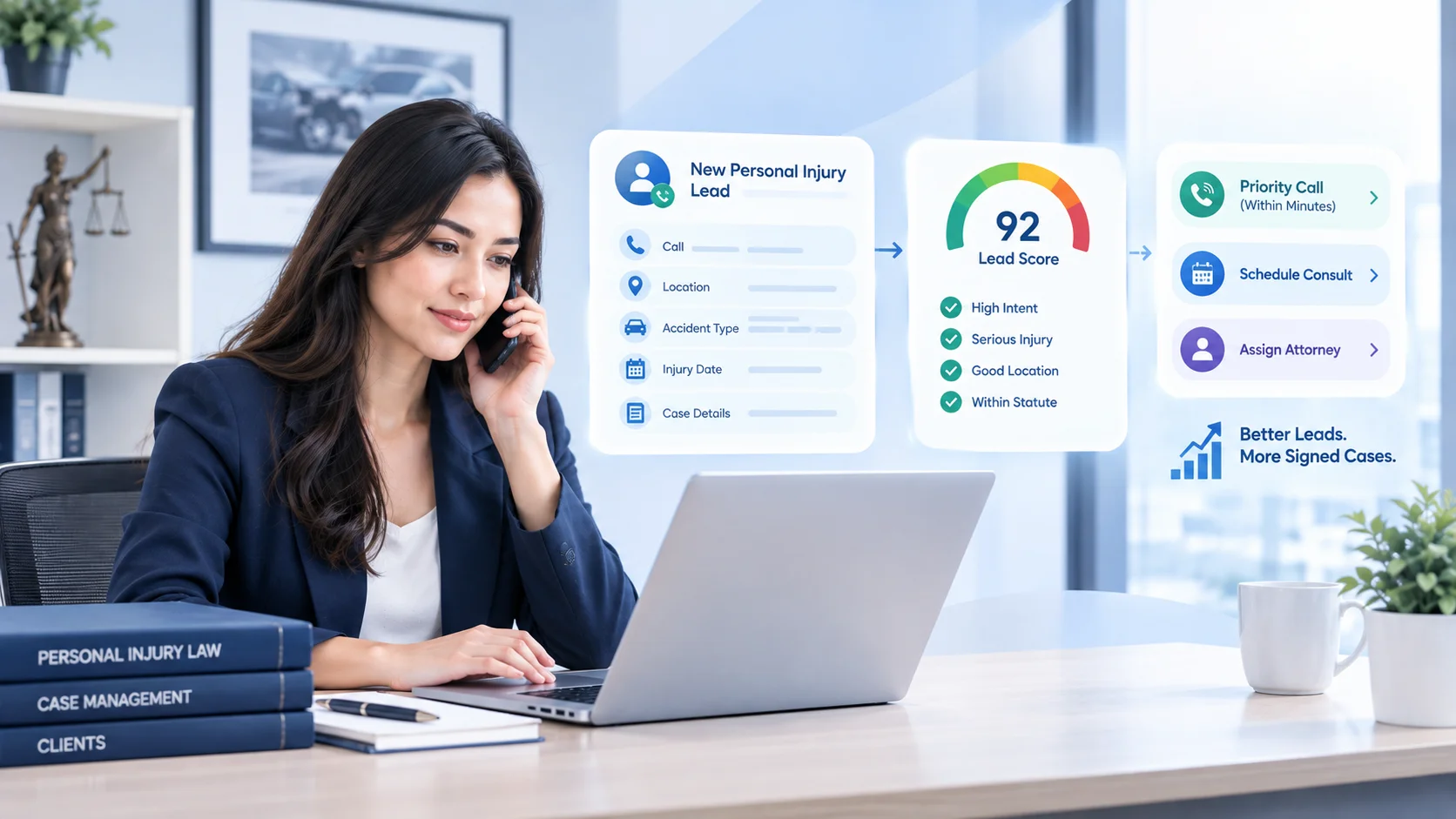
- Score and route leads by practice area, jurisdiction, and case value
- Run conflict checks against your existing matter database
- Schedule consultations directly into attorney calendars
- Send pre-consultation reminders and intake document requests
- Drip educational content to leads that are not ready yet
- Request reviews automatically after a matter closes
- Track referrals from past clients and co-counsel
- Report on cost per signed case by source and campaign
Most firms only need three to five of these workflows live at a time. Pick the ones tied to the biggest revenue leaks first.
The Best Legal Marketing Automation Tools In 2026
The best legal marketing automation tool depends on firm size, practice area, and existing case management software. Most stacks combine one legal-specific CRM with two or three general-purpose tools.
Legal-Specific Marketing Automation Platforms
These tools are built for law firms, with intake forms, e-signatures, conflict-check integrations, and bar-aware messaging.
- Lawmatics. Strong on CRM, intake, automation, and reporting. Often chosen by growing consumer firms.
- Law Ruler. Heavy intake automation with built-in SMS, dialers, and e-sign. Popular with personal injury and mass tort firms.
- Clio Grow. Tight integration with Clio Manage for firms already on Clio.
- MyCase. Practice management with built-in marketing automation features for small and mid-size firms.
- PracticePanther. Centralizes client communications with automation for admin and follow-up.
General Marketing Automation Tools
These platforms add scale on email, content, and analytics. They usually plug into a legal CRM.
- HubSpot. Full-stack CRM and marketing automation, with a free CRM tier and deep reporting.
- ActiveCampaign. Strong email and SMS automation at mid-market price points.
- Mailchimp. Easy email automation and templates for smaller firms.
Specialized Add-On Tools
These cover specific gaps most legal CRMs do not handle as well alone.
- CallRail. Call tracking and call-source attribution.
- Calendly or YouCanBookMe. Self-service scheduling for consultations.
- Birdeye or NiceJob. Review requests and reputation management.
- Zapier or Make. Glue between tools that do not natively integrate.
Legal Marketing Automation Tools Compared
The table below maps the most common tools by best fit and primary use. Use it as a shortlist starter, then trial two or three.
Always confirm direct integrations with your existing case management system before signing. A tool that needs a Zapier workaround for every step often costs more in maintenance than it saves.
For a deeper review of intake-side software, see Legal Intaker's roundup of the best client intake software for law firms.
Seven Legal Marketing Automation Strategies That Work
The strategies below are the workflows that produce the most measurable ROI for law firms. Build them in this order.
Speed-To-Lead Automation
Speed-to-lead automation sends an instant SMS and email to every new lead within seconds of form submission or missed call. It is the single highest-impact workflow most firms can deploy.
Set it up so the message comes from a real person at the firm, confirms the lead's matter, and offers a same-day consultation link. Pair it with a live intake answering service for nights and weekends.
Multi-Channel Nurture Sequences
Nurture sequences keep leads warm who are not ready to hire yet. Build short, useful sequences per practice area, mixing email, SMS, and optional retargeting.
A common pattern: four emails over two weeks, an educational PDF, and one SMS check-in. Stop the sequence the moment the lead books or replies.
Intake Form Automation With Conflict Checks
Replace static contact forms with conditional intake forms that adjust by practice area. The form should run a conflict check against your existing client database before booking the consultation.
This eliminates intake-team rework and surfaces conflicts before an attorney's calendar is blocked. A solid law firm client intake process is the foundation that makes the automation pay off.
Appointment Scheduling Automation
Self-service scheduling tools let qualified leads book directly into attorney calendars. The right setup adds buffers, sends reminders, and makes rescheduling easier for both clients and staff.
Automated reminders help reduce missed consultations and keep intake moving without adding more administrative work to your team.
Review Request Workflows
A short, automated SMS and email sequence at the close of a matter is the simplest way to lift Google and Avvo review counts. Time it well, keep the message personal, and never incentivize reviews in ways state bar rules prohibit.
Referral Tracking
Build a CRM tag for every referral source and trigger a thank-you note when a new lead lists a referrer. Quarterly automated check-ins keep co-counsel and past clients top of mind.
Referrals still produce some of the lowest cost per signed case, so the tracking is worth the setup.
Re-Engagement Campaigns for Past Clients
Many law firms overlook past clients as a source of repeat business and referrals. Automated follow-up campaigns can help firms stay top of mind by sending periodic check-ins, holiday messages, appointment reminders, or updates about relevant legal services.
This approach is especially useful for practice areas with ongoing or life-event-driven legal needs, such as estate planning, family law, immigration, and business law. When done professionally and in compliance with bar advertising rules, re-engagement campaigns can strengthen long-term client relationships without requiring constant manual outreach.
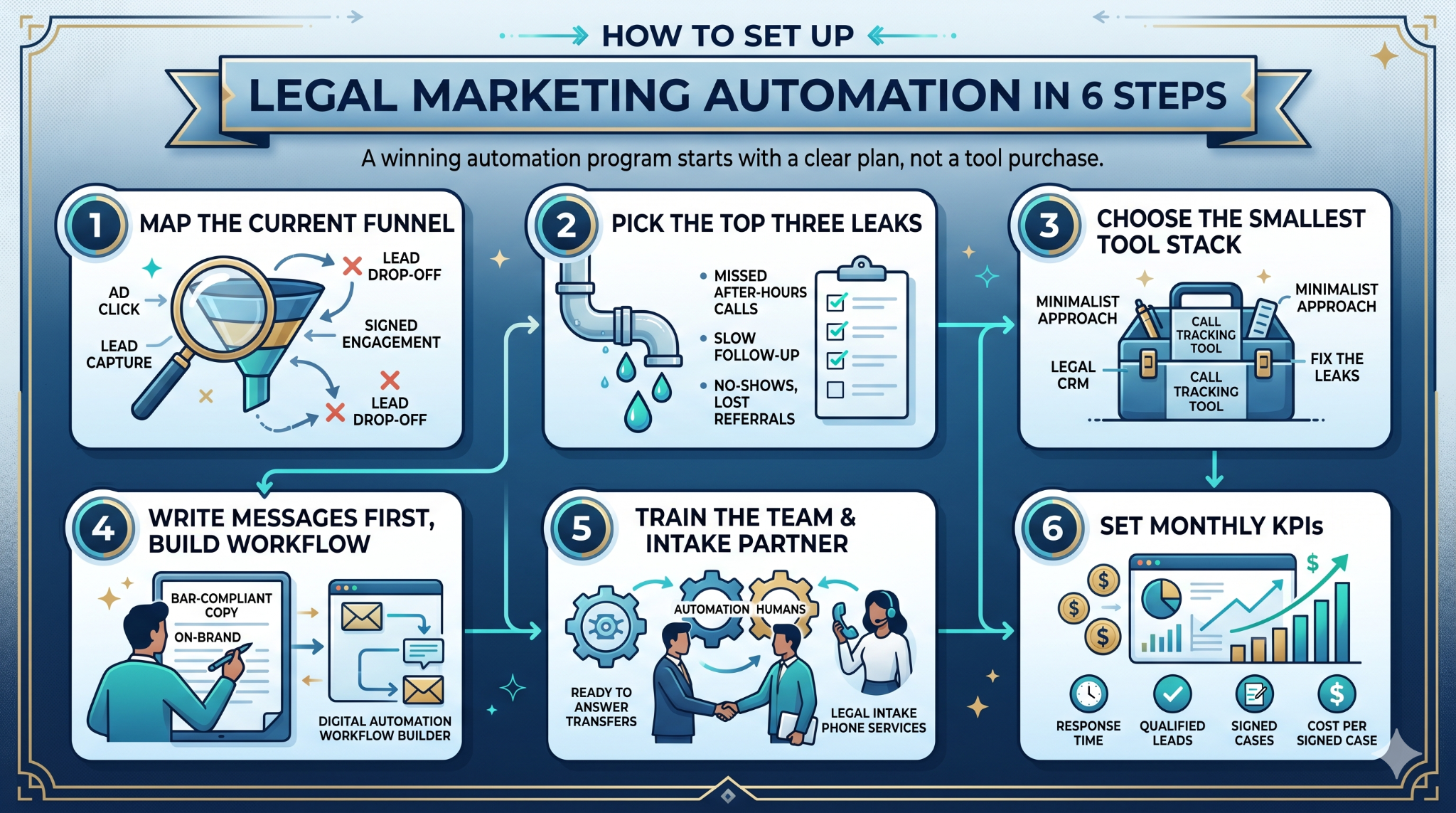
How To Set Up Legal Marketing Automation In 6 Steps
A working legal marketing automation program starts with a clear plan, not a tool purchase. Build it in six steps.
- Map the current funnel. Identify every step from ad click to signed engagement, and mark where leads drop off.
- Pick the top three leaks. Common ones: missed after-hours calls, slow follow-up, no-shows, lost referrals.
- Choose the smallest tool stack that fixes them. One legal CRM, one call tracking tool, one scheduler is usually enough to start.
- Write the messages first, then build the workflow. Keep copy on-brand and bar-compliant.
- Train the team and an intake partner. Automation only wins when humans are ready to answer the transfers it generates. Legal intake phone services cover the gaps automation cannot fill alone.
- Set monthly KPIs. Measure response time, qualified leads, signed cases, and cost per signed case by source.
Plan for a 60-day ramp before judging results. Most automation workflows need real data to optimize.
Legal Marketing Automation Ethics And Compliance
Legal marketing automation must comply with the American Bar Association Model Rules of Professional Conduct and every state bar advertising rule that applies to your firm. Automation does not change the standard. It multiplies the volume of messages your firm sends, which makes ethics review more important, not less.
Practical checklist:
- ABA Model Rule 7.1: no false or misleading communications
- Disclaimers on outcome examples and testimonials
- Clear sender identity on every automated email and SMS
- TCPA compliance for SMS, including opt-in language and easy opt-out
- CAN-SPAM compliance for email
- Honest review request language with no prohibited incentives
Run every new automated message through marketing review, ethics review, and a final read by the lawyer responsible for advertising. The American Bar Association publishes ongoing guidance on lawyer advertising worth tracking.
How To Measure ROI On Legal Marketing Automation
Measure legal marketing automation ROI by tracking cost per signed case and response speed, not vanity metrics like open rates. The five formulas below cover most decisions.
- Lead Response Time = Time from form fill to first human touch
- Cost Per Lead (CPL) = Channel spend / Leads generated
- Cost Per Qualified Lead (CPQL) = Channel spend / Leads passing intake criteria
- Cost Per Signed Case (CPSC) = Channel spend / Signed matters
- Automation ROI = (Revenue from new cases minus tool and labor cost) / Tool and labor cost
Review the scorecard monthly per channel and per workflow. A workflow that lifts leads but not signed cases needs a copy, audience, or intake fix, not a bigger budget.
Common Legal Marketing Automation Mistakes
Many legal marketing automation problems come from unclear workflows, poor follow-up timing, or relying too heavily on software without enough human oversight. Here are some common issues law firms should watch for when building automation systems.
Using too many disconnected tools
Running several platforms that do not communicate well with each other can create duplicate records, missed follow-ups, and inconsistent client communication. Many firms benefit more from a smaller, well-integrated system.
Automating before fixing the intake process
Automation works best when the underlying intake workflow is already organized. If lead qualification, response times, or handoff procedures are unclear, automation can amplify those issues instead of solving them.
Sending overly generic messages
Potential clients often respond better to communication that reflects their legal issue, urgency, or practice area. Generic templates may feel impersonal and reduce engagement.
Overlooking TCPA and bar advertising rules
SMS campaigns, email sequences, and automated follow-ups should be reviewed carefully for compliance with marketing regulations and legal advertising requirements.
Focusing only on marketing metrics
Open rates and click-through rates can provide useful signals, but many firms ultimately care more about consultations booked, signed clients, and case value.
Removing the human element entirely
Automation can help organize and speed up communication, but many legal matters still require timely human interaction. Firms often see better results when automation supports intake staff instead of replacing them completely.
The fix is usually fewer tools, tighter copy, and tighter intake, in that order.
Turning Automation Into Signed Cases
Automation only pays off when it ends in a signed case. The bottleneck is rarely the tool. It is the team and the workflow that catches the lead the moment automation hands it off.
See how Legal Intaker pairs bilingual legal intake specialists with HIPAA-grade workflows that plug directly into Lawmatics, Law Ruler, Clio Grow, and the other CRMs your automation runs on. Review Legal Intaker pricing or book a walkthrough to see how it fits your firm's stack.

Frequently Asked Questions:
What is legal marketing automation in simple terms?
Legal marketing automation is software that runs a law firm's marketing and intake tasks automatically. It captures leads from forms and calls, sends instant follow-up, books consultations, and updates the CRM without manual effort, all while staying within bar advertising rules.
What are the best legal marketing automation tools?
The most established legal-specific platforms include Lawmatics, Law Ruler, Clio Grow, MyCase, and PracticePanther. Many firms also pair a legal CRM with general tools such as HubSpot, ActiveCampaign, Mailchimp, CallRail, and Calendly. The right stack depends on firm size and practice area.
How much does legal marketing automation cost?
Most legal CRM and automation platforms run between $100 and $500 per user per month, with mid-market firms often spending $1,500 to $6,000 monthly across the full stack. Larger firms pay more for enterprise plans. Add roughly 10 to 20 percent for setup and training in year one.
Is legal marketing automation worth it for a small firm?
Yes, for most small firms. Even a basic stack of a legal CRM, a call tracking tool, and a scheduler usually pays for itself within a few signed cases. The biggest gains come from faster lead response and fewer no-shows, both of which a small firm can deliver only with automation.
Does marketing automation create bar compliance risk?
Automation does not change advertising rules. It increases the volume of messages a firm sends, which makes ethics review more important. Every automated email, SMS, and form needs to comply with ABA Model Rule 7.1, the firm's state bar rules, TCPA for SMS, and CAN-SPAM for email.
Can marketing automation replace an intake team?
No. Automation handles the repetitive parts of intake (instant response, reminders, scheduling, data capture), but human specialists still need to qualify cases, run conflict checks with judgment, and build trust with callers. The strongest setups pair automation with a trained intake team.
How long does it take to see results from legal marketing automation?
Most firms see early wins (faster response, fewer no-shows) within 30 days. Cost per signed case usually improves over 60 to 90 days as workflows are tuned. Long-term plays like past-client re-engagement and review velocity build over six to twelve months.





.png)
.png)



























.webp)

.webp)









.webp)